
SearchNear Me
Wishlist
SwipeDiscover
AIOnlyFans
FeaturedFrinderNewSwipeDiscoverCalculator
Boost
  1. Home
  2. Blog
  3. OnlyFans AI Voice Notes
📚Guides

OnlyFans AI Voice Notes

Making money on subscription sites isn't just about posting photos. Connection is key. Photos bring subscribers in, but talking to them in the DMs is what makes them stay and spend big money. However, you cannot type messages or record voice notes all day. It takes too much time, especially if you are trying to handle multiple Fanvue accounts at once to increase your earnings. That is where Fanvue AI helps. It allows you to send personal voice messages instantly, without recording yourself eve
Edward Yeager

Edward Yeager

Editor-in-chief

Herman helps creators grow and make money on Fanvue. He's written over 1,000 guides breaking things down in a simple, no-bullshit way — from building a brand to getting real paying fans.

On YouTube (@ai-influencer-expert) he shares tips on content creation, marketing, and how to turn social media into a full-time income. He also runs a fast-growing community on Skool where members share what works, help each other, and together earn over $150K per month. Herman is the chief editor at aionlyfans.com

🎓 SkoolTelegramYouTubeInstagramInstagram

Making money on subscription sites isn't just about posting photos. Connection is key. Photos bring subscribers in, but talking to them in the DMs is what makes them stay and spend big money.

Keep reading — AI OnlyFans guides

  • Related tool: our ranked AI OnlyFans creator list

However, you cannot type messages or record voice notes all day. It takes too much time, especially if you are trying to handle multiple Fanvue accounts at once to increase your earnings.

voice

That is where Fanvue AI helps. It allows you to send personal voice messages instantly, without recording yourself every time.

In this guide, we will teach you two easy methods:

  1. Fanvue's "My AI": See exactly how Fanvue My AI works using the tool built inside Fanvue.
  2. ElevenLabs: How to make realistic voices using an outside app.

Let's get started.

Method 1: Using Fanvue’s Built-In "My AI" Voice Tools

Fanvue has teamed up with ElevenLabs, a famous voice technology company, to bring AI voices directly into your account. This tool lets you create a voice that sounds just like you (or your character) so you can "speak" to fans even when you are asleep.
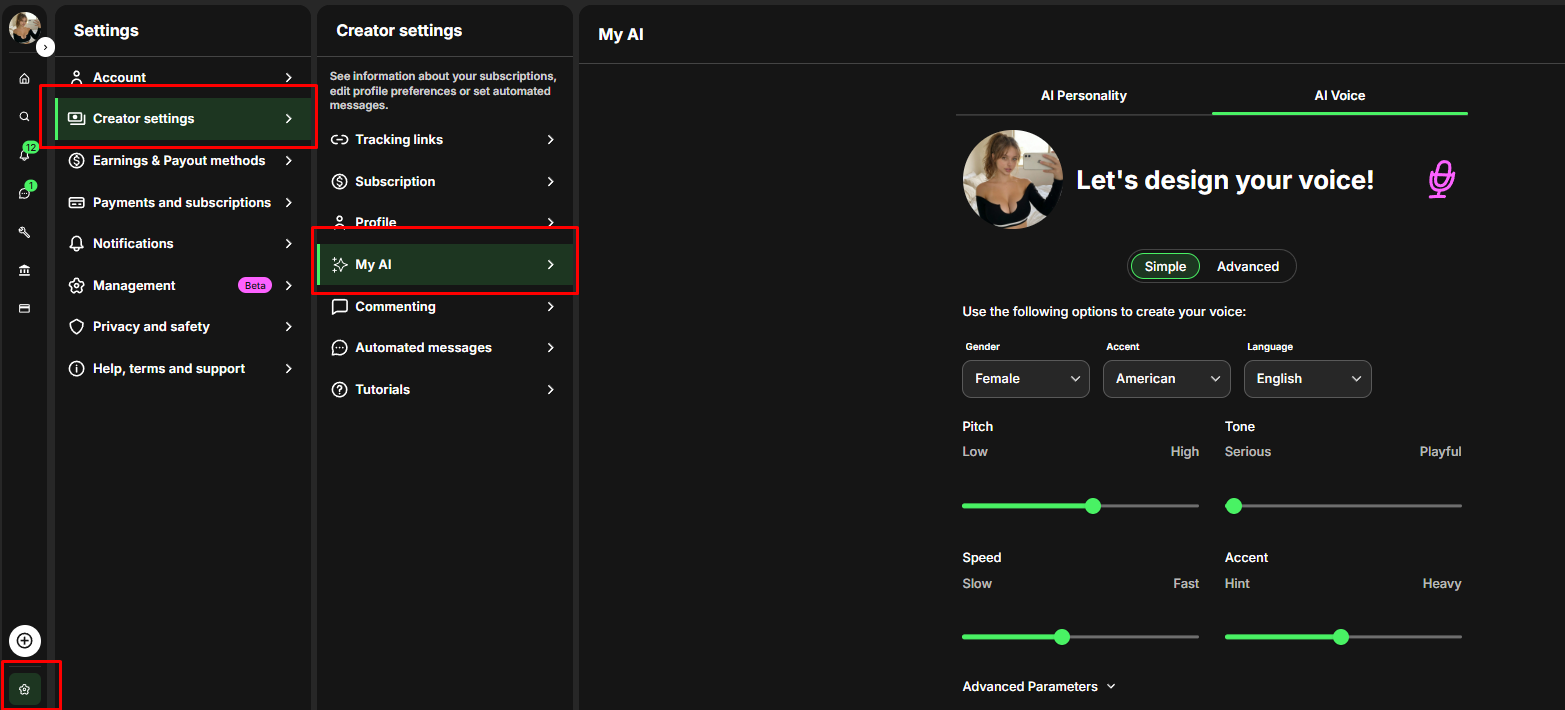
fanvue settings
Go to Settings: Open your Fanvue dashboard, click on Settings, then Creator Settings, and find the "My AI" tab.

How to Set It Up

  1. Go to Settings: Open your Fanvue dashboard, click on Settings, then Creator Settings, and find the "My AI" tab.
  2. Select AI Voice: You will see options for "AI Personality" (text) and "AI Voice" (sound). Click AI Voice.
  3. Create Your Sound:
    • Cloning: If you have a real voice, upload a few recordings. The AI will learn your pitch and tone to make a digital twin.
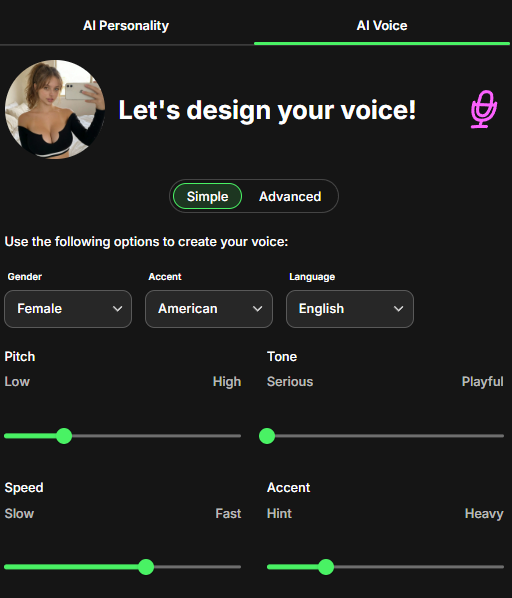
    • Designing: If you want a completely new voice for an anonymous character, you can adjust the settings to build one from scratch.
fanvue
Use settings similar to this for max realism. Most women in the world don't have a super high pitch, the "playful" setting sounds forced, and speed should be more than half.
audio-thumbnail
ElevenLabs 2026 01 19T16 26 27 Leighton Apathetic Valley Girl pvc sp99 s37 sb54 se38 b m2
0:00
/1.515063

How to Use It in Chat

Once you set this up, the tool lives right inside your message inbox.
fanvue
  1. Open a Chat: Click on a message from a fan.
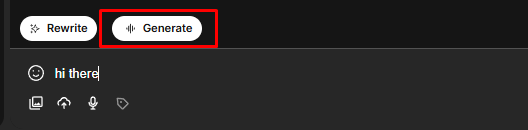
  2. Write or Generate: Type what you want to say, or use the "Generate message with AI" button to have the bot write a reply for you.
  3. Click "Generate Audio": Press the audio button next to the text box. In a few seconds, your text turns into a voice note.
  4. Send: The fan gets a personal voice message that sounds authentic, making them feel special.

When to Use It

  • The "Always On" Trick: Use this when you are at the gym, on vacation, or sleeping. It makes fans think you are always available.
  • Fast Replies: Use this to clear your inbox quickly. Creating an AI audio message is much faster than recording 50 real voice notes yourself.

Method 2: Using ElevenLabs for Professional Audio

Fanvue's internal tool is great for speed, but the ElevenLabs website is more powerful. It gives you better control over how the voice sounds. It is also perfect for building a "Voice Note Bank"—a collection (just like having a folder of PPV'S) of ready-to-use audio files that you can send to thousands of fans instantly.
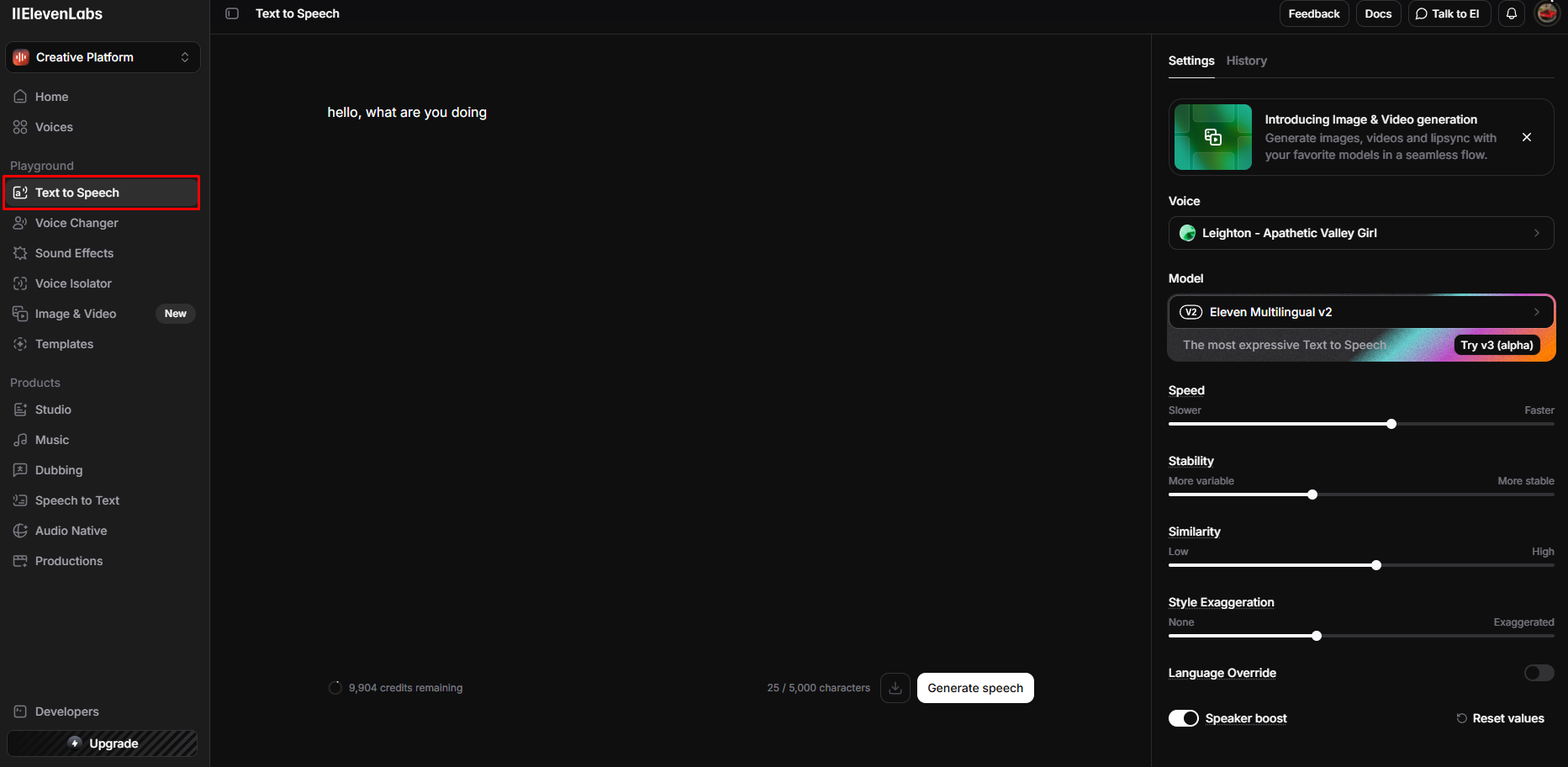
elevenlabs

How to Create Your Voice

  1. Go to Voice Design: Log in to the ElevenLabs website and click on Playground > Text to Speech.
  2. Describe what to say: You need to tell the AI exactly what to be said.
    • Example: "hello, what are you doing."
  3. Play around with the settings
  4. Generate and Save: Click the generate button. If you like how it sounds, save it and give it a name (e.g., "Chloe Main Voice").
audio-thumbnail
ElevenLabs 2025 12 25T09 20 07 Leighton Apathetic Valley Girl pvc sp99 s37 sb54 se38 b m2
0:00
/2.40325

Create a "Voice Note Bank" (Save Time)

Do not make a new message for every single person. Instead, use ElevenLabs to make a library of general messages that work for everyone.

  • Starters: Make clips like "Hey handsome, how was your day?" or "I was just thinking about you."
  • Selling Content: Make clips to help sell your locked posts, like "Are you going to leave me hanging?" or "Unlock the video to see more."
  • For Big Spenders ("Whales"): For fans who spend a lot of money, type their real name into the tool. Hearing their name in your voice makes them very happy and encourages them to tip more.
Pro Tip: When you download an audio file, name it exactly what the voice says (example: hi_babe_how_was_ur_day.mp3). This makes it easy for you to find the right file quickly when you are chatting.

Summary: Which Method Should You Use?

Feature
Fanvue Internal AI
ElevenLabs (External)
Best For
Real-time, specific replies to individual questions in DMs.
Creating high-quality, reusable "mass message" blasts and marketing assets.
Speed
Instant (integrated into the chatbox).
Slower (requires download/upload).
Customization
Good (uses your cloned voice).
Excellent (granular control over stability, clarity, and style).
Cost
Part of the platform features.
Subscription based (starting around $5/mo).

Think of text messages like a black-and-white photo. They are nice, but simple.

💡
Making money with AI Voicenotes:
- moaning the gooner's name (sell the voicenote)

Voice messages are like a 3D movie. They feel real, exciting, and alive.

By using these AI tools, you stop being just a profile on a screen and become a real person to your fans. When fans hear your voice, they trust you more and spend more. Do not just type; start speaking. Your fans (and your bank account) will notice the difference immediately.

Edward Yeager

Edward Yeager

Editor-in-chief

Herman helps creators grow and make money on Fanvue. He's written over 1,000 guides breaking things down in a simple, no-bullshit way — from building a brand to getting real paying fans.

On YouTube (@ai-influencer-expert) he shares tips on content creation, marketing, and how to turn social media into a full-time income. He also runs a fast-growing community on Skool where members share what works, help each other, and together earn over $150K per month. Herman is the chief editor at aionlyfans.com

🎓 SkoolTelegramYouTubeInstagramInstagram
AI Model Launchpad - Make Models. Print Money.
Edward Yeager

Edward Yeager

Mar 22, 2026

— ⏱️ 5 min read

OnlyFans AI Voice Notes – AI OnlyFans blog guide and creator tips
AI Model Launchpad - Make Models. Print Money.

Related Articles

What Is the Best Time to Post on Reddit for Fanvue Creators – AI OnlyFans blog guide and creator tips
📚 Guides

What Is the Best Time to Post on Reddit for Fanvue Creators

Learn the best time to post on Reddit for Fanvue creators, when Fanvue models get the most traffic, and the posting schedule that works.

What Is Reddit CQS and Why It Matters for Fanvue – AI OnlyFans blog guide and creator tips
📚 Guides

What Is Reddit CQS and Why It Matters for Fanvue

Reddit CQS affects whether your Fanvue posts get seen. Learn what it is and how to keep it high.

How to Warm Up a Reddit Account for Fanvue Promotion – AI OnlyFans blog guide and creator tips
📚 Guides

How to Warm Up a Reddit Account for Fanvue Promotion

A new Reddit account that starts promoting immediately gets banned. Here is how to warm up a Reddit account for Fanvue promotion step by step with the exact timeline we follow.

From the directory

Discover AI OnlyFans creators

Browse verified AI OnlyFans creators featured across the AI OnlyFans directory.

Paolafanvue profileViktoriafanvue profileJasminfanvue profileBiancafanvue profilePriyafanvue profileSabinefanvue profile
All creatorsBest MILFBest Big TitsBest Big AssBest BlondeBest BrunetteBest LingerieBest GymBest TrendingOnlyFans near meFree OnlyFans creatorsBrowse all creators

Explore AI OnlyFans

Find creators, categories & tools

Every main AI OnlyFans hub, popular category, and creator location in one place, linked for fans and search engines.

BrowseAll modelsCreators A-ZCategories & locationsBest creatorsFeatured
CollectionsFree profilesAI ModelsNear meDiscover
For creatorsPricingAdd your profileEarnings calculatorBlog

Search OnlyFans by category

AmateurFitNewNudeNudesGirlBig TitsBig AssBrunetteSexSubmissiveDick RatingLingerieCollege StudentBoobsTeenPussySlim

Search OnlyFans by location

HawaiiSouth KoreaUSAAll countries
AIOnlyFans

An independent promotional website for discovering online content creators. Third-party links redirect to external platforms.

Quick Links

  • Browse Models
  • Creators A–Z index
  • Featured
  • Best Models
  • Categories & Locations
  • Near Me
  • Pricing
  • Discover
  • Blog
  • AI OnlyFans Earnings Calculator
  • Add Your Profile

Support

  • Contact Us
  • About Us
  • DMCA Takedown
  • Disclaimer
  • Terms & Privacy
  • FAQ
  • Partners

Follow us

  • Instagram
  • Telegram
  • Reddit
  • X (Twitter)

Reviews

TrustpilotProduct Hunt

© 2026 AIOnlyFans.com. All rights reserved. Independent promotional website

Made with for content creators