
If you shoot content with anyone other than yourself, an OnlyFans release form is not optional. Creators lose accounts over this more often than you'd think, and almost always for the same avoidable reasons: a name that doesn't match the passport, a form dated after the content went live, or a co-star who never signed anything because they had a verified OnlyFans account and everyone assumed that was enough. It never is.
This guide covers what the form is, when you need it, how to fill it out without getting flagged, and the mistakes that actually get creators banned.
What Is an OnlyFans Release Form?
An OnlyFans release form is a legal document that confirms three things about anyone who appears in your content:
Consent. The person voluntarily agreed to be filmed. A verbal agreement has no legal force. If your co-star changes their mind six months later, a signed form is your only protection.
Age. The person is 18 or older, confirmed by a government issued ID. Without documented proof you are exposed to serious legal risk regardless of how old they look.
Permission to monetize. The person understands their image will be sold commercially on OnlyFans. Consent to be filmed is not the same as consent to monetization.
OnlyFans operates under US jurisdiction and builds its rules around 18 U.S.C. §2257, a federal law requiring proof of age and consent from all participants in adult content. This applies to every creator on the platform regardless of country.
Do You Need a Release Form for OnlyFans?
If you are a solo creator and no one else appears in your content, you do not need one. Your identity and consent were confirmed during signup as part of the standard OnlyFans profile setup.
If anyone else appears or is heard in your content, you have two options:
Option 1: Tag their verified OnlyFans profile in every post they appear in.
Option 2: Submit a signed release form. This is the better option if your co-star does not have a verified profile, does not want to be tagged, or if you want a permanent record that does not depend on their account staying active.
Two common misconceptions worth addressing. First, partners and spouses are not exempt. Anyone visible or audible in your content needs to be verified or have a signed form on file. Second, if a face is not visible but a person can be identified by their voice, body, or physical characteristics, a form is still required.
OnlyFans Model Release Form vs Consent Form vs Participant Release Form
These three terms refer to the same document. OnlyFans uses them interchangeably and they all serve the same legal function: confirming age, consent, and permission to monetize.
In practice, "model release form" is used when working with another creator or hired model. "Participant release form" comes up when the co-star is a partner or friend without a creator account. "Consent form" is the platform's preferred term in official communications. The document itself is identical regardless of what you call it.
The only form that is genuinely different is the 2257 model release form, covered later in this guide.
How to Find the OnlyFans Release Form PDF
Sign in to your creator account. Go to the left sidebar and select the Release forms tab.
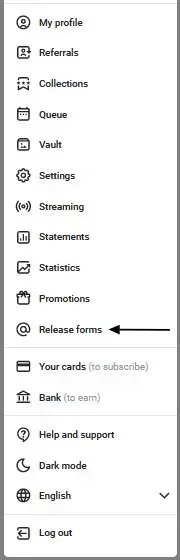
You will see two options:
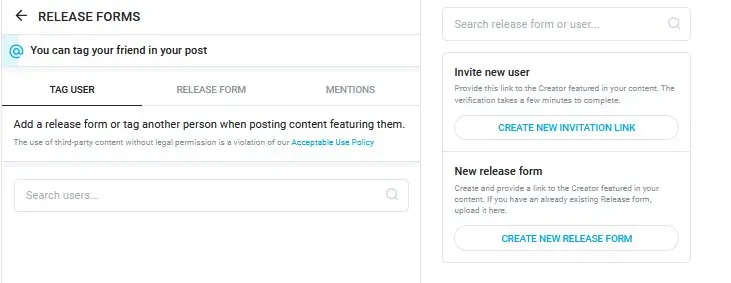
Invite new user generates a verification link for your co-star. They complete a brief identity check including a photo of their ID and a selfie. Once done, you can tag them in posts without needing a separate form.
New release form lets you download the OnlyFans release form PDF. Print it, have your co-star fill it out and sign it, then submit the signed copy through the same menu.
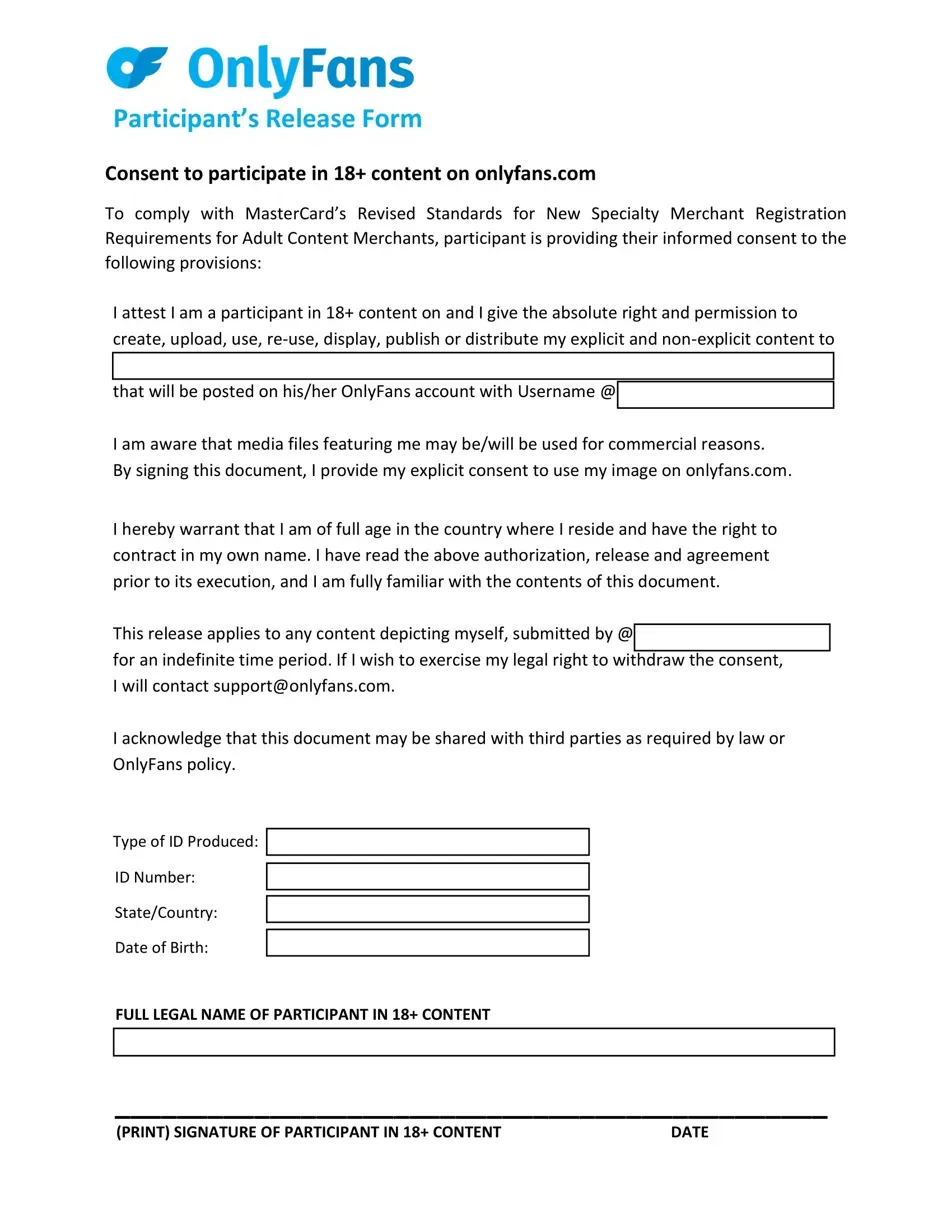
Always download directly from your account to get the latest version. Forms found through Google searches may be outdated. You can also email OnlyFans to request a PDF copy if needed.
How to Fill Out the OnlyFans Release Form Correctly
The form is straightforward but the details matter. A single mismatch between the form and your co-star's ID is enough for OnlyFans to reject it.
Full legal name. Must match the passport exactly. No abbreviations, no nicknames in place of legal names. These are separate fields.
Date of birth. Confirmed by a government issued ID. Passports, driver's licenses, and national ID cards are accepted. Student IDs and corporate badges are not.
Date of filming. Must correspond to the actual day of shooting and logically precede the date of publication. Vague entries like "August 2026" without a specific date are grounds for rejection.
Content description. Be specific about the type of content and explicitly state consent to commercial distribution. If the content is PPV, describe it as such. See our guide on OnlyFans PPV messages for how creators typically structure paid content.
ID verification. A clear photo or scan of a government issued ID with all information legible. No glare, no cropped edges, no blur. For ID cards, both sides are required.
Selfie with document. Your co-star holds their open ID next to their face alongside the signed form. This confirms the form was signed by the actual document owner.
The release form is just one of several OnlyFans features creators need to stay on top of to keep their account in good standing.
OnlyFans Release Form Example: Common Mistakes to Avoid
Reports from creators suggest thousands of posts are removed monthly for release form violations. Here are the most common mistakes:
Using a nickname instead of a legal name. The form must contain the name exactly as it appears on a government ID.
Assuming a verified OnlyFans account replaces a form. Having an account is not enough. If you are not tagging their verified profile on every post, you need the form.
Thinking hidden faces do not require a form. If any part of a person can be used to identify them, a form is required.
Vague content descriptions. Moderators need to confirm the co-star understood what they consented to, including the commercial nature of the content.
Date mismatches. If the form is dated after the content was published, moderators will flag it. Fill out the form before or on the day of filming.
Expired or unclear ID documents. Blurred scans or expired IDs will be rejected. Check the quality of every scan before submitting.
What Happens If You Don't Submit a Release Form?
OnlyFans monitors content for compliance automatically. When a violation is detected, the platform sends you an email and gives you 48 hours to submit a valid release form or have your co-star verify their identity.
Miss that window and the content is removed. Repeat violations put your account at risk of suspension or a permanent ban. This applies regardless of how long the content has been live and the platform makes no exceptions, including for top earners.
OnlyFans Collaborations and Release Forms
Collaborations are one of the fastest ways to grow your subscriber base, but they are also one of the most common reasons creators get content taken down. Every collaboration means at least one release form needs to be in place before you shoot anything.
The process is the same regardless of whether your co-star is a verified OnlyFans creator or someone without an account. If you are tagging their verified profile on every post they appear in, you are covered. If not, you need a signed form. Do not assume the collaboration itself implies consent for commercial use.
For the full strategy on growing through collabs and other channels, see our guide on how to promote your OnlyFans.
What Is a 2257 Model Release Form?
The 2257 model release form is a separate legal document required under US federal law, 18 U.S.C. §2257. It is not the same as the OnlyFans consent form and the two are not interchangeable.
If you are based in the US and shooting explicit content with other people, you are legally required to have their 2257 forms on record independently of what OnlyFans requires. If this applies to you, consult a lawyer familiar with adult content law.
FAQ
What is an OnlyFans release form?
A legal document confirming that anyone appearing in your content is over 18 and has consented to being filmed and having that content sold on OnlyFans.
Do you need a release form for OnlyFans if you shoot solo?
No. If you appear alone in all your content, your signup verification covers you. If you are just getting started, see our guide on how to start an OnlyFans.
Where can I find the OnlyFans release form PDF?
Go to the Release forms tab in your account's left sidebar and select New release form. You can also email OnlyFans to request a copy.
What is an OnlyFans participant release form?
The same document as the consent form and model release form. OnlyFans uses these terms interchangeably.
What happens if I do not submit a release form?
OnlyFans gives you 48 hours to fix it. If you miss the window, the content is removed. Repeat violations can result in account suspension or a permanent ban affecting your active OnlyFans subscriptions.
Does my partner need to fill out a release form?
Yes. Romantic partners and spouses are not exempt. Anyone who appears or is heard in your content must be verified or have a signed form on file.
What is a 2257 model release form?
A separate US federal legal requirement under 18 U.S.C. §2257. It is not the same as the OnlyFans consent form and the two are not interchangeable.
What if my co-star refuses to provide their ID or sign the form?
Do not film with them. Publishing content featuring an unverified person puts your account at serious risk.